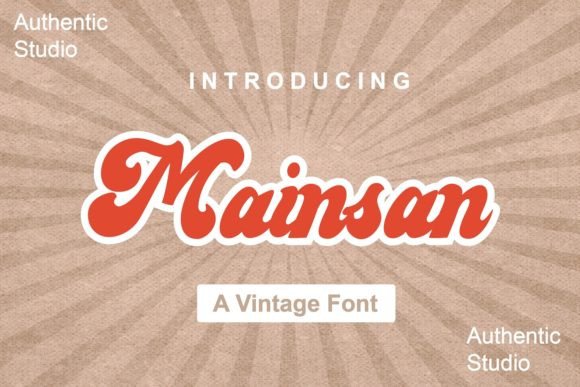
✦ ScriptHandwritten & flowing — perfect for invitations and logos
About This Font
Whimsical Nostalgia in Every Line Mainsan is a charming, handwritten font that embodies a playful sense of nostalgia, transporting you to a bygone era of effortless style and carefree charm. With its imperfect, hand-crafted lines and subtle imperfections, this beautiful script font captures the essence of vintage charm, inviting you to create beautiful and evocative designs that evoke a sense of warmth and personality. From greeting cards and invitations to branding and advertising, Mainsan is the perfect choice for designs that require a touch of retro sophistication. Use it to add a sense of whimsy and playfulness to your projects, whether you're creating a new logo, designing a wedding invitation, or crafting a social media campaign. Mainsan's expressive lines and fluid curves will bring a unique touch to your work, making it stand out from the crowd and connect with your audience on a deeper level.
Type your words, set them in any of our 80,000+ fonts,
and export a clean SVG — or a transparent PNG, or a finished mockup on a
t-shirt, tote or mug. No sign-up, no watermark.
How it works
Three steps, entirely in your browser.
STEP 1
Type your text
Your own words, live — names, quotes, a shop slogan.
STEP 2
Pick a font and a surface
Preview it flat, or dropped onto a t-shirt, tote, mug, tumbler or journal.
STEP 3
Export
SVG for cutting machines, transparent PNG for print, or the full mockup image.
What you can export
Every format comes out at full quality, free.
SVGTrue vector outlines — the format Cricut Design Space, Silhouette Studio and Illustrator expect. Scales to any size without softening.
PNGTransparent background at high resolution, ready for sublimation, DTF or any print-on-demand upload.
MockupYour design rendered on a real product photo — useful for a listing image or showing a client before you cut anything.
What people make with it
Cricut & Silhouette cut filesT-shirt and apparel graphicsSublimation & DTF transfersEtsy listing mockupsTumbler and mug wrapsWedding signageLogo and wordmark drafts
Questions
Is it really free?
Yes. No account, no watermark and no export limit. The tool runs in your browser, so your text never leaves your device.
Will the SVG work in Cricut Design Space?
Yes — the export is a true vector path, not an image traced into one, so it uploads and cuts cleanly. The same file opens in Silhouette Studio, Illustrator, Inkscape and Figma.
Can I sell what I make?
That depends on the font, not on the tool — each font page states its licence. Many are free for personal use with a commercial licence available from the original designer, and the licence line links straight to the source.
Do I need to install the font first?
No. The font loads in the page, so you can set your text and export without installing anything. You can still download the font file separately if you want it on your system.