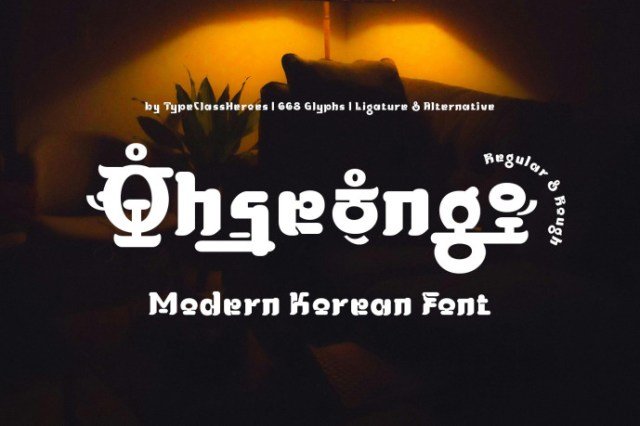
Ohseong - Korean

✦ Script · 1 style 1 Files Free License
Ohseong - Korean — free script font
0px
The quick brown fox
✦ Script Handwritten & flowing — perfect for invitations and logos

About This Font

Ohseong - Korean: Playful Hangul-Inspired Display Typeface with Rounded Bold Shapes

Ohseong is a distinctive display typeface that channels the structural essence of Korean Hangul through a modern, experimental lens. It features bold, rounded characters adorned with small circular details and solid lines that mimic phonetic elements without attempting full authenticity. The result is a visual style that feels both grounded and whimsical, offering a characterful presence that stands out in crowded design spaces. This font balances traditional proportions with unrestrained artistic flair, creating a mood that is simultaneously warm, energetic, and uniquely contemporary.

This versatile typeface shines in creative projects where a touch of Korean aesthetic is desired without strict adherence to traditional calligraphy. It is ideal for eye-catching poster designs, bold branding identities, and dynamic title treatments that need to grab attention instantly. Designers can leverage its playful geometry for social media graphics, event invitations, or editorial headers that seek to convey cultural nuance with a free-spirited twist. The expressive shapes invite customization, allowing for varied applications in digital and print media where personality is paramount.

Key Features
Display typeface with a Hangul-inspired, rounded bold aesthetic
Perfect for posters, branding, titles, and contemporary visual projects
Includes unique decorative alternates and experimental character shapes
Available in high-quality TTF and OTF formats for cross-platform compatibility

Bring a bold, playful Korean touch to your next creative project with Ohseong.

More Script Fonts

Font Details

Best for

Compare Fonts

Same category only
Playfair Display
Aa Bb Cc
Aa Bb Cc
🎨
Design Area
Customize & export your text on real mockups
✦ EXCLUSIVE
° 100%
✦ Drag text or image to reposition · Alt+scroll to resize text
100%
📄
Mockup image will appear here
Replace with your PNG image
Cutting this on a Cricut? How the SVG export works →

♥ My Favorites