Lost in Space

✦ Display · 1 style 1 Files Free License
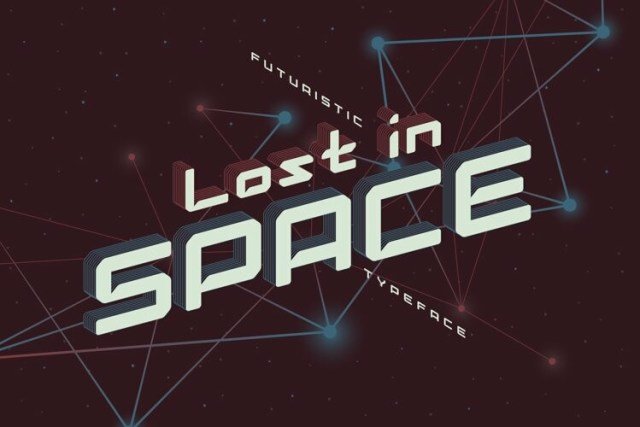
Lost in Space — free display font
0px
The quick brown fox
✦ Display Bold & expressive — made to grab attention in headlines

About This Font

Lost in Space Futuristic Geometric Vintage Typeface

Step into a retro-futuristic universe with Lost in Space, a typeface that perfectly bridges the gap between nostalgic charm and modern sci-fi aesthetics. This geometric vintage font features clean, precise lines that evoke the golden age of space exploration while maintaining a contemporary edge. Its bold structure and unique character combinations create a distinct visual identity that feels both timeless and forward-thinking. The design exudes a sense of adventure and mystery, making it an instant favorite for creatives who love a touch of cosmic flair in their work.

Perfect for project titles, album covers, and poster designs, this font brings an immediate sense of wonder to any layout. Use it to headline your science fiction book covers, brand your indie video games, or create eye-catching social media graphics for tech startups. The included vector bonuses allow for seamless customization, ensuring your designs stand out with professional polish. Whether you are designing a logo for a space-themed cafe or a banner for a music festival, Lost in Space provides the versatile foundation needed to capture attention instantly.

Key Features
Geometric vintage style with modern futuristic influences
Ideal for sci-fi titles, album art, logos, and event posters
Includes editable text and applied extruded line effects in vector formats
Available in OTF, TTF, EPS, and AI files with expanded curves

Bring your creative visions to life with a font that truly travels beyond the stars.

Perfect for: Food & Restaurant Fonts

More Display Fonts

Font Details

Best for

Compare Fonts

Same category only
Playfair Display
Aa Bb Cc
Aa Bb Cc
🎨
Design Area
Customize & export your text on real mockups
✦ EXCLUSIVE
° 100%
✦ Drag text or image to reposition · Alt+scroll to resize text
100%
📄
Mockup image will appear here
Replace with your PNG image
Cutting this on a Cricut? How the SVG export works →

♥ My Favorites